
Simple Invoice – Print issue after windows update
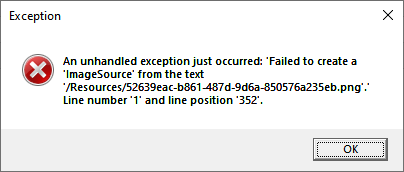
We have received reports of problems starting Simple Invoice after installing the latest Windows updates.
The issue has been confirmed and appears to be related to changes introduced by Microsoft in the latest Windows and .NET security updates.
Windows 10
On Windows 10, the problem may occur after installing update KB5120709.
At this time, the only confirmed way to restore Simple Invoice functionality is to uninstall update KB5120709.
How to uninstall KB5120709 on Windows 10
- Open Windows Settings.
- Go to Update & Security.
- Select Windows Update.
- Click View update history.
- Select Uninstall updates.
- Find KB5120709 in the list.
- Select the update and click Uninstall.
- Restart your computer when prompted.
- Start Simple Invoice and check whether the problem has been resolved.
Windows 11
A similar issue has also been reported on Windows 11 following the latest updates.
If Simple Invoice stopped working immediately after installing the latest Windows update, check your update history and identify the recently installed update.
How to uninstall an update on Windows 11
- Open Settings.
- Go to Windows Update.
- Select Update history.
- Scroll down and select Uninstall updates.
- Find the most recently installed update related to the problem.
- Select Uninstall.
- Restart your computer.
- Start Simple Invoice and check whether the problem has been resolved.
Will there be an update to Simple Invoice?
We are currently investigating whether Simple Invoice can be modified to work with the changes introduced by Microsoft.
Because the issue is related to Windows and .NET security changes, it may also require an official fix from Microsoft. Therefore, at this stage, we cannot guarantee that the problem can be completely resolved through an update to Simple Invoice alone.
We will continue to monitor the situation and, if technically possible, release an update to Simple Invoice that ensures compatibility with the new Windows security requirements.
Until an official fix from Microsoft or a compatible Simple Invoice update is available, the only confirmed workaround is to uninstall the affected Windows update.
Uninstalling a Windows security update should be considered a temporary workaround. Once Microsoft releases a corrected update that resolves the compatibility issue, we recommend installing the latest Windows security updates again.